MySQL stored procedures:
Enhance standardization, performance and code reuse
MySQL stored procedures are program units that are not
only stored, but executed on the MySQL server. They are, for the most
part, logic that has been removed from the application and placed on
the database server. Once called from an application over a distributed
network, MySQL stored procedures provide a means of interacting in a
prescribed way with the database without placing any additional traffic
on the network.
Databases like Microsoft SQL and Oracle have included stored
procedures for years, but they are relatively new to MySQL (MySQL 5.0).
Why go to the trouble of extracting logic from your
application, putting it into a different format, and and placing it on
the database server? There are several advantages to doing so. Here is
a (incomplete) list of some of the most commonly sited advantages:
- As alluded to above, MySQL stored
procedures can greatly cut down on the amount of traffic going back and
forth over your network.
- Stored procedures can greatly improve the
security of your database server. SQL that is executed on the server is
not subject to SQL injection attacks.
- Stored procedures provide a way to abstract
and separate data access routines from the business logic of your
application.
- Stored procedures allow these routines to
be accessed by programs using different platforms and API's, and make
your applications more portable.
MySQL stored procedures are written in the MySQL stored program
language, which is ANSI SQL:2003 compliant. It has a block structure
similar to Oracle PL/SQL and IBM DB2 SQL.
It is full featured, with statements used to manipulate
variables, conditional execution, iterative processing and error
handling. MySQL stored procedures can accept parameters from the
calling program, and can send a result back. SQL is integrated directly
into the procedural code, using standard syntax.
Stored procedures can be created directly from the MySQL
command line in much the same way as a table or other database object.
Let's take a look at a simple example. Suppose we had a
website for history buffs, and we wanted to have a little section on
our homepage where we would list notable events that occurred on that
date throughout history. We want to automate this section so that it
updates automatically each day. We'll create a simple table to store
the events for each day:
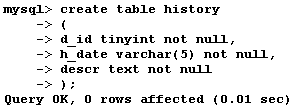
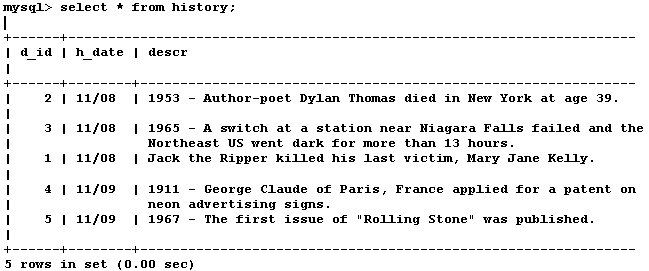
We'll put some entries in for the date of November 8 and 9,
so that the output of our table looks like this:
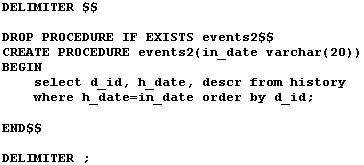
Now we'll create a stored procedure to execute the necessary
SQL and return our result set for a given date. For readability I will
present the code as text here:
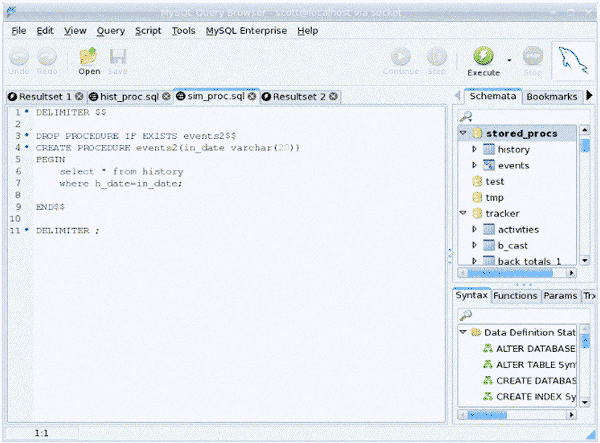
MySQL stored procedures can be created from the MySQL command
line, but this quickly becomes impractical as procedures get longer and
more complex. Below is a view of our stored procedure being created in
the MySQL query browser. This program, which is available from MySQL
for free, provides a convenient way to create and edit stored programs
and other database objects.
It provides the skeleton code for a new stored procedure, and
you can save your code to a file, create the stored procedure, and test
your code from the Query view. The query browser also offers a
graphical representation of all your schemata, and allows you to
perform many database management chores in point and click style.
Let's go through the lines of code one at a time:
- The first line of code sets a delimiter for ending the
stored procedure. The default delimiter for MySQL commands is the
semicolon, but semicolons are used inside stored procedures at the the
end of statements. The '$$' sign is commonly used to signal the end of
the program.
- The DROP PROCEDURE statement deletes the procedure if you
are editing an existing program.
- The CREATE PROCEDURE command names the procedure (events2)
and establishes the name and type of parameters that the procedure will
accept, if any. This procedure accepts an IN parameter named 'in_date'
which has the data type varchar(20). IN parameters are the default in
MySQL stored procedures, so the 'IN' designation is not necessary here.
Any modifications that occur to an IN parameter inside of a stored
procedure are not visible to the calling program. OUT parameters can be
initialized by the calling program and sent to the stored procedure,
and then sent back to the calling program in a modified state.
- The procedural code of the program is contained in a bock
that begins with the BEGIN statement and ends at the END statement.
- SQL statements are placed inside of stored procedures using
the same syntax as at the MySQL command line.
- The procedure is ended with END$$, then the delimiter is
set back to the default semicolon.
This prevents confusion when commands are from the command line after
executing a stored procedure.
After saving the procedure to a file (I've called mine sim_proc.sql),
you can create the stored procedure from the MySQL command line or the
query browser Query view with the following command:

After creating the MySQL stored procedure you can try it out
from the command line or the MySQL query browser in this way:
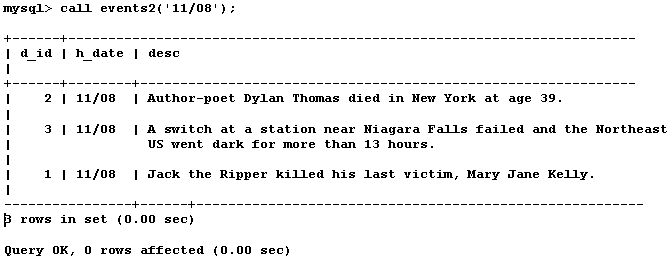
The result is the set of rows having the date 11/08.
The following code creates a stored procedure that makes use
of a cursor to loop through the result set. This allows the opportunity
to execute some SQL and do some processing with the output of the
select statement at each iteration of the loop.
In this case we simply insert each row into a temporary table
and then display the contents of that table at the end. This code can
be copied and pasted into the MySQL query browser:
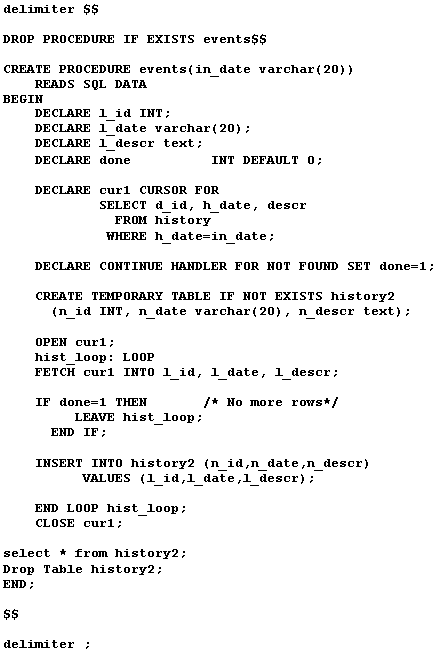
As you can see, variables in MySQL stored procedures must be
declared, along with their data type. The two other structures added
here, the loop and the IF/THEN statement should be familiar to anyone
who does programming in a procedural language.
The IF/THEN statement makes use of the HANDLER that sets the
variable 'done' to a value of 1 when there are no more rows to add to
the result set, and the loop is exited.
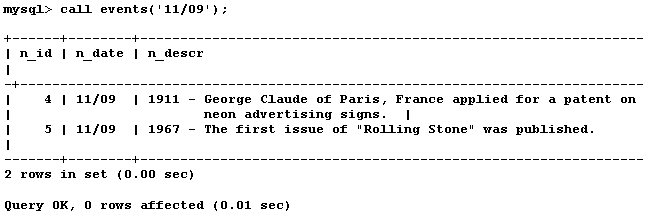
Let's take a look at the output of this procedure. This time
we'll select events from November 9:
This is all well and good but it doesn't get our output into a
web page. The following PHP script, which I have named events2.php,
calls the events2 stored procedure, sends the IN parameter '11/08' to
the stored procedure, and prints the results to the browser.
It does this through the use of methods provided by the mysqli
extension of MySQL.
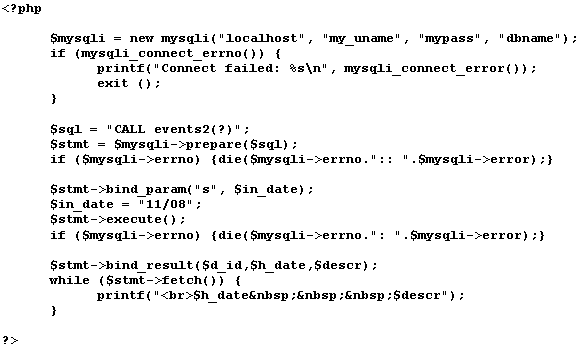
When using mysqli, you must call it when connecting to the
database. The code then creates prepared statements to call the events2
stored procedure which can be reused as many times as needed. The IN
parameter is designated as a string in this case and associated with
the 'in_date' variable name from the stored procedure. In this case the
value of the string is '11/08'. (One further benefit of using prepared
statements is that they protect your application from SQL injection
attacks.) In a live rendition of this code the IN parameter value can
be obtained by selecting the current date from MySQL and then using the
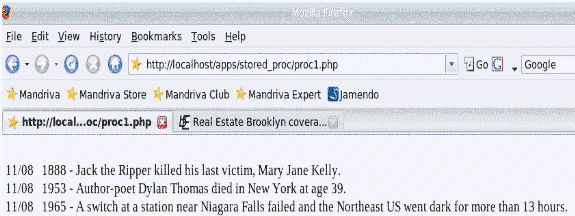
date_format() function to extract the month and day. Here is the result
of our code rendered in a browser:
So there is an introduction to the world of MySQL stored procedures.
Stored procedures can provide many benefits for you as an application
developer or a DBA.
There are many more possible uses for them than can be
demonstrated here. There is a lot of good information at the MySQL
website.
One good book on the topic is MySQL Stored Procedure
Programming by Guy Harrison with Steve Feuerstein, O'Reilly.
Feuerstein is a well reknowned author on Oracle stored procedures as
well as MySQL stored procedures, and I personally recommend his books.
Return to MySQL DBA
|